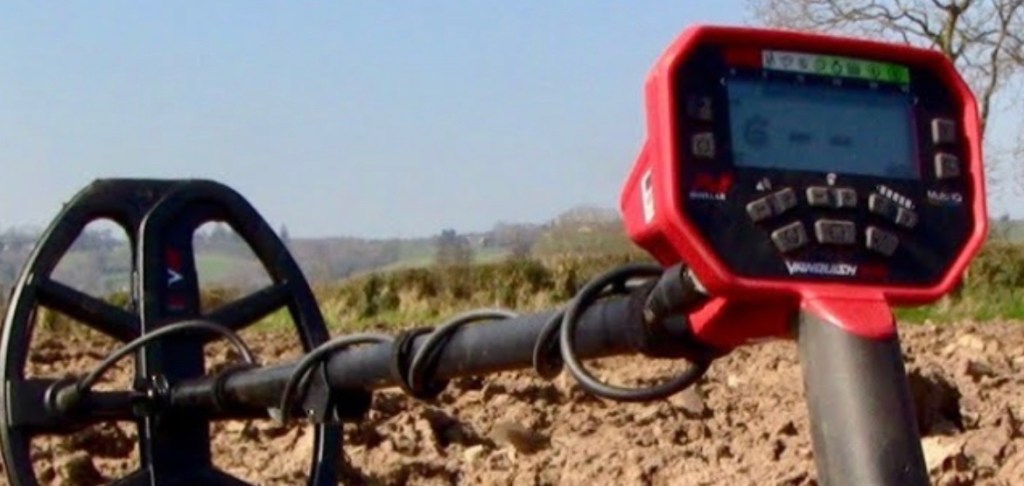
The main differences in modes are as follows:
Relic Mode:
deepest ground penetration but slowest recovery speed (SWING SLOWLY ). It doesn’t discriminate anything, so you will find iron targets as well as coins, but if 2 or more targets are under the coil, it will think it’s only 1 target with a really confusing tone and VDI number.
Coin Mode:
Least amount of ground penetration, (though still plenty deep enough for any targets you are likely to find), but fastest recovery speed, which allows for better target seperation and identification. It also discriminates out all the ferrous targets, (-9 to 0), most foil targets, (1 to 10). Which means (in my personal experience) a lot of the GOLD items as well, (3 to 9)
Jewelry Mode:
Depth and recovery speed in between “coin” and “relic” modes. Only discriminates ferrous targets, (-9 to 0), and has a different tone break from iron grunt to low tone, so really small gold is recognized.
Custom Mode:
With Custom mode you can pick the VDI numbers you wish to discriminate. As you can with the 3 above mentioned modes. The only difference is, when you turn the machine off and back on, in the custom mode, whatever program you had set up in your last/ previous hunt will still be set up the way you last had it where the other 3 modes will reset to detect all metals within their field of range.
ALL METAL Mode:
All Metal mode is a mode in which you cannot discriminate any VDI numbers. Once in this mode you will be able to pick up any and all metals within -9 to +40 VDI. Usually when I have found a target in any of the other modes, I will quickly press the All Metal button ( horseshoe button on left side of the control module) just to make sure I have not found a false reading. ( IE iron target reading precious metal targets ). If you get the same reading as the other mode you were in, Chances are you have found an object with the correct VDI # and a solid hit that was on your screen originally. If it’s a VDI # you like then dig it for sure. I utilize this mode and tactic often, Especially when I only have a short time to hunt and do not want to waste time digging garbage. Yes I know I pass over lots of good targets doing this but sometimes I only have an hour or so and don’t want any pull tabs lol.
SETTINGS
lower Iron Bias setting
This setting will allow the natural response to dominate which means that the target is more likely to be classified as a nonferrous target when there’s a mixed tone response. A higher setting will increase the likelihood that the same target is classified as ferrous.
If an item has a mixture of iron and precious metal in it as many items found do, then turn your iron Bias setting on low . Press and hold the iron button (horseshoe) and FE will appear on screen, then at the same time press the plus or minus volume button to turn it up or down.
Ferrous vs Non Ferrous
Ferrous targets. The word “ferrous” usually refers to materials that have a lot of iron in them. It’s common for these materials to be strongly magnetic, but, “not all of them are”. Different types of iron and steel are more or less magnetic.
Non Ferrous
Non-ferrous metals are alloys or metals that do not contain any appreciable amounts of iron. All pure metals are non-ferrous elements, except for iron (Fe), which is also called ferrite from the Latin ‘ferrum,’ meaning “iron. If you are looking for precious metals such as GOLD, or SILVER, then you are looking for NON FERROUS metals
I personally like jewelry mode, with the “all metal mode”. my “FE” turned low, I usually only have sensitivity about 1/2 to 3/4 way up, because where I hunt doesn’t need more than that, and I get better target seperation than if it was full on. Also, and I know I’m going to catch a lot of flack for this but I will discriminate #13&14 due to I hate digging pull tabs all the time and since the majority of precious gold items I have found have never came it at 13 or 14 let alone that finding those items are rare as it is. I figure I can forgo the good items (most, NOT ALL of the time) at those VDI #’s
Sensitivity settings
Many people think sensitivity will effect depth or ground penetration! Although you may loose a small amount of depth with lower sensitivity what it really does is reduce ground chatter, static noise returns in heavy mineralized ground. When you turn on your machine turn your sensitivity all the way up to full, if you hear lots of noise then turn down until the noises settle down. This is where your machine will be at an optimal sensitivity for the ground your working.
Final note on discrimination. Remember that, Yes, you can notch out numbers to avoid bottle caps and pull tabs, but be warned. Foil is usually 1 – 10(ish) and pulltabs, bottle caps, etc., are usually between 12- 17 Nickels are usually 12-13, so you’d think you could notch out 1 -through- 19 and save a lot of hassle… BUT… gold & other jewelry, (depending on size, shape, and purity (k)), can ring up ANYWHERE between 1 to 40 on these machines. If you notch out any numbers between 1 & 19, you’ll save yourself from digging 300 pulltabs and other garbage, it’s true. However you’ll miss the gold jewelry that is also hiding there. Most gold items I have found or other people I’ve chatted with have found, usually come between the VDI#’s 3 to 10 however I have seen so many others on social media come it at a range of numbers that discriminating any numbers can men loosing a very valuable find.
It is said that after about 100 hrs, you’ll start noticing subtle differences in tone quality, which is a better indicator of what the target is, than VDI numbers. I still look at the numbers myself, however,
Use discrimination sparingly, unless you are just coin shooting, and take the time to really learn how to listen to your machine. It doesn’t take long to learn how to ignore trash signals, and learning is half the fun. I’m still new to this but I’m picking up something new every time I get the chance to swing a coil.
 Relic XPeditions